Architecture
Technical overview of the ReportBridge platform — components, data flow, API surface, and infrastructure.
Two-Account AWS Model
Customer Data Account
PostgreSQL and SQL Server instances live in the customer's own AWS account. Report data never leaves their environment.
Application Tier Account
Lambda, API Gateway, report server EC2, workspace RDS, and demo environment. Connects to customer data via VPC peering. Demo reports use isolated sample data with no customer data exposure.
Config-Driven Lambda
- Only 4 bootstrap environment variables are required at deploy time. All other configuration is loaded at runtime from the Domo Config DataSet.
- Fixed outbound IP via NAT gateway allows customers to whitelist a single IP in their PostgreSQL security group.
High-Level Architecture Flow
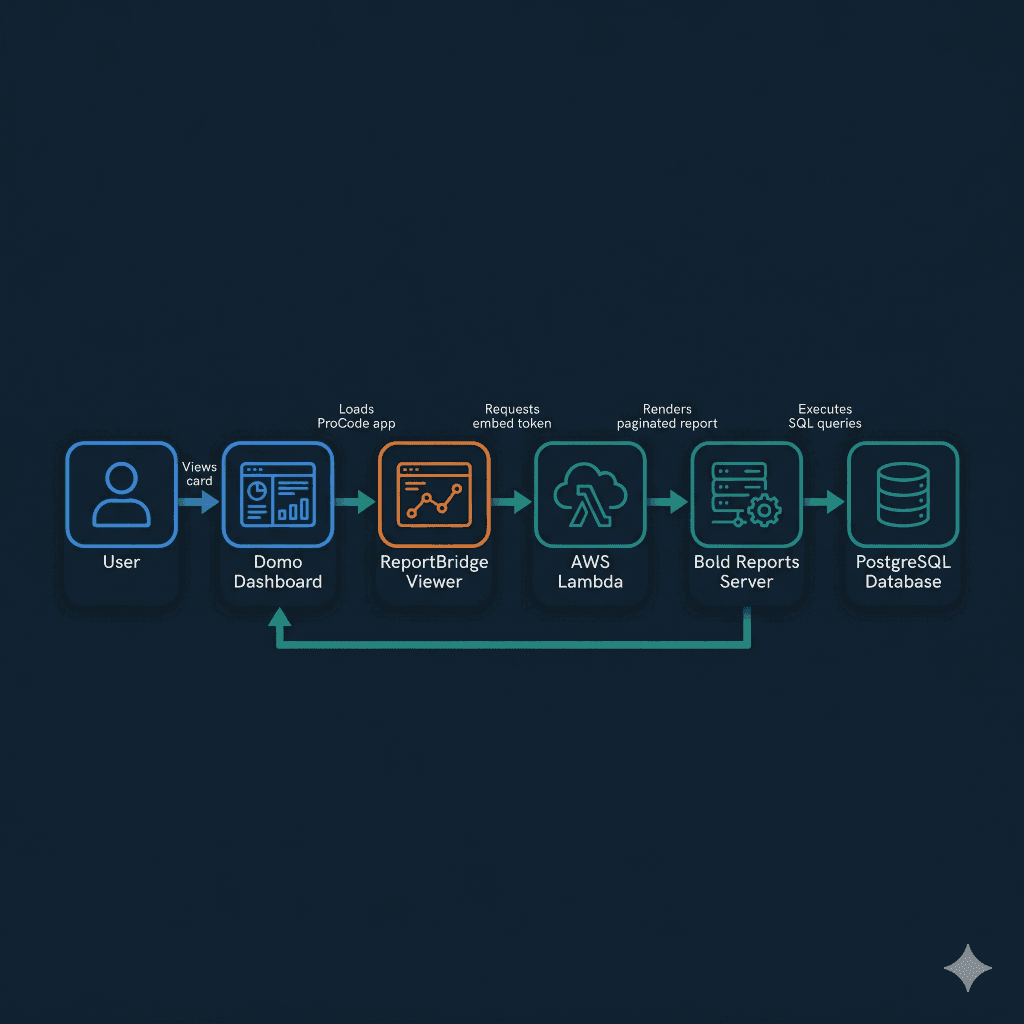
User in Domo Dashboard
Domo Everywhere iframe
ReportBridge Viewer
Requests embed token (HMAC-SHA256 auth)
AWS Lambda API (API Gateway)
Returns signed token
Report Server (EC2 Docker)
Executes SQL queries (Npgsql connector)
PostgreSQL (RDS / EC2)
Returns result sets; renders paginated report
User in Domo Dashboard
Domo Everywhere iframe
ReportBridge Viewer
Requests embed token (HMAC-SHA256 auth)
AWS Lambda API (API Gateway)
Returns signed token
Report Server (EC2 Docker)
Executes SQL queries (Npgsql connector)
PostgreSQL (RDS / EC2)
Returns result sets; renders paginated report
Flow Summary
- A Domo user opens a dashboard containing a ReportBridge card.
- Domo Everywhere renders the card as an iframe hosting the ReportBridge Viewer (a React ProCode app).
- The Viewer requests an embed token from the AWS Lambda API, authenticated via HMAC-SHA256.
- The Viewer embeds the report server in a nested iframe, passing the signed token.
- the report server reads the RDL file natively, executes PostgreSQL queries through its Npgsql connector, and renders the paginated report server-side.
- The rendered report is displayed inside the Domo card with full paginated fidelity.
Migration Pipeline
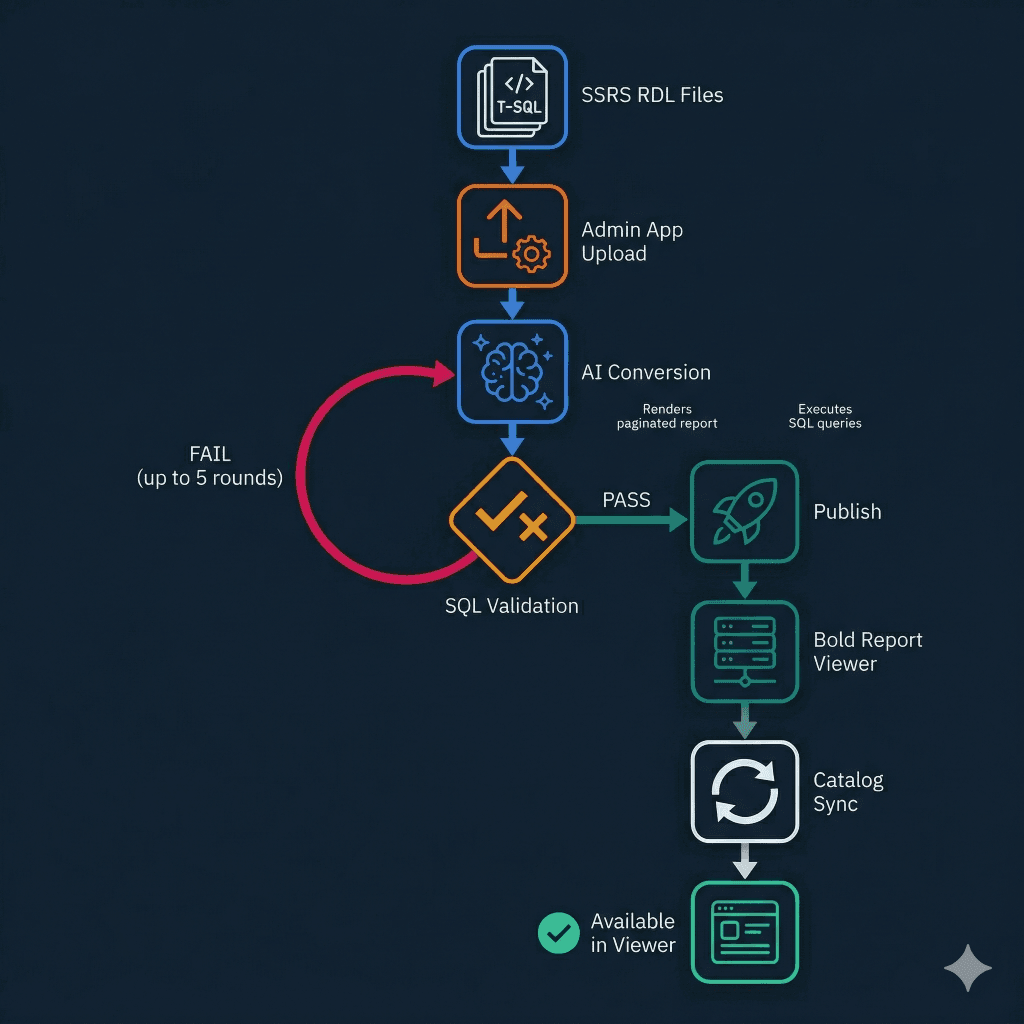
Original SSRS RDL Files
T-SQL queries
ReportBridge Admin App (React ProCode)
Upload, BOM stripped, datasources replaced
AI Conversion (Claude via Anthropic API or AWS Bedrock)
Send T-SQL + schema context
SQL Validation (EXPLAIN against PostgreSQL)
PASS or FAIL
Auto-Fix Loop (up to 3 rounds)
Re-sent to AI with error context
Publish to the report server
Report Server (EC2 Docker)
Available in ReportBridge Viewer
Pipeline Summary
- Upload original SSRS RDL files through the ReportBridge Admin App. BOM characters are stripped and datasource references are replaced automatically.
- The AI Conversion Engine (Claude) receives each T-SQL query along with the target PostgreSQL schema context.
- Converted SQL is validated via
EXPLAINagainst the live PostgreSQL instance. - If validation fails, the query re-enters the AI conversion loop with error context for up to 3 rounds of automatic correction.
- Once all queries pass, the converted RDL is published to the report server and the Domo catalog DataSet is updated.
- The report becomes immediately available to end users in the ReportBridge Viewer.
Components
| Component | Technology | Purpose | Runs On |
|---|---|---|---|
 ReportBridge Viewer ReportBridge Viewer | React (Domo ProCode) | End-user report viewer with sidebar navigation, category grouping, search, and embed token authentication | Domo (iframe) |
 ReportBridge Admin ReportBridge Admin | React (Domo ProCode) | Admin UI for report catalog, AI conversion, batch publish, database configuration, access control, and audit log | Domo (iframe) |
| Lambda API | Node.js + pg (AWS Lambda) | Central API bridge; handles embed tokens, dataset writes, SQL testing, schema discovery, AI proxy, and report publishing | AWS Lambda (VPC), API Gateway |
| ReportBridge Report Server | RDL rendering engine (.NET), Docker Compose, nginx | Native RDL / RDLC rendering engine | AWS EC2 (Docker Compose) |
| PostgreSQL (report data) | PostgreSQL 14+ | Stores migrated SQL Server data across multiple databases per jurisdiction | AWS EC2 or RDS |
| PostgreSQL (report server metadata) | PostgreSQL | Internal metadata store for the report server | Docker container on report server EC2 |
| Config DataSet | Domo DataSet | Instance settings: 46 columns covering report server host, credentials, authentication mode, AI config, database mappings, and DataSet IDs | Domo |
| Viewer Config DataSet | Domo DataSet | Viewer-safe configuration with HMAC-signed token, API URL, and display settings (no passwords or API keys) | Domo |
| Catalog DataSet | Domo DataSet | Report inventory with status, group assignments, conversion metadata (24 columns) | Domo |
| Databases DataSet | Domo DataSet | PostgreSQL connection configurations per data source (12 columns) | Domo |
| Audit DataSet | Domo DataSet | Timestamped log of every conversion, test, publish, and configuration change | Domo |
| AI Conversion Engine | Claude (Anthropic API / AWS Bedrock) | Converts T-SQL to PostgreSQL with schema-aware context | Anthropic Cloud / AWS Bedrock |
| ALB + ACM Certificate | AWS Application Load Balancer | HTTPS termination and TLS for the report server | AWS |
| Workspace Database | PostgreSQL 16 (AWS RDS) | Application state: report inventory, dataset metadata, conversion history, parameter definitions, organization config. Postgres-authoritative with automated schema versioning. | AWS RDS (db.t4g.micro) |
| OpenResty Reverse Proxy | OpenResty (nginx + Lua, Docker) | CORS headers, HTTPS header rewriting, and request routing | Docker container on report server EC2 |
Lambda API Actions
Report Rendering
rendering| Action | Description |
|---|---|
get-embed-token | Generates HMAC-SHA256 signed embed token for report server iframe authentication. Accepts jurisdiction context. |
get-embed-url | Generates a signed embed URL for iframe embedding with HMAC-SHA256 nonce, timestamp, and user email. |
get-viewer-session | Validates viewer token, fetches user groups, filters catalog server-side, returns embed token and sanitized config. Logs session to audit. |
Report Publishing and Validation
publishing| Action | Description |
|---|---|
publish-report | Uploads converted RDL (base64) to the report server via API. Temp-name-then-rename strategy. |
validate-report | Downloads RDL, extracts SQL, executes against PostgreSQL for end-to-end verification. |
bold-proxy | Generic proxy for report server API calls. Category listing, report metadata, admin operations. |
reconcile-catalog | Compares Domo catalog against the report server. Identifies mismatches and orphans. |
SQL Testing and Schema Discovery
sql| Action | Description |
|---|---|
test-sql | Validates SQL via EXPLAIN (plan only, no execution). |
run-sql | Executes SQL with LIMIT 1 for runtime error detection. Read-only transaction enforced. |
test-pg | TCP connectivity test to PostgreSQL host/port. |
fetch-schemas | Retrieves all table/column schemas from PostgreSQL for AI context. |
Domo Integration
domo| Action | Description |
|---|---|
write-dataset | Writes rows to Domo DataSet via OAuth. Full replace and append modes. |
list-groups | Lists all Domo groups for Access Control assignment. |
list-user-groups | Fetches group memberships for a specific Domo user. Used by viewer for server-side access filtering. |
create-datasets | Auto-creates 5 required DataSets (config, catalog, databases, audit, viewer-config) with correct schemas. Used by Setup Wizard. |
Administration
admin| Action | Description |
|---|---|
generate-viewer-token | Creates HMAC-SHA256 signed viewer token and derived API key. Writes viewer-safe config to Viewer Config DataSet. |
bold-health-check | Checks report server health via documented health-check endpoints. Used by CI smoke tests. |
update-dataset-schema | Adds missing columns to existing Domo DataSets. Used for zero-downtime schema evolution. |
AI Conversion
ai| Action | Description |
|---|---|
anthropic-proxy | Proxies to Anthropic API or AWS Bedrock with retry on 503 (exponential backoff). |
Workspace Database
workspace| Action | Description |
|---|---|
ws-extract-rdl | Extracts SQL queries and metadata from uploaded RDL files. Stores report, datasets, and parameters in workspace DB. |
ws-convert-sql | AI converts a T-SQL dataset query to PostgreSQL with schema-aware context. Auto-stores result in workspace DB. |
ws-fix-sql | AI fix loop: sends failing SQL with error context and previous attempts for iterative correction. |
ws-test-all | Tests all dataset queries for a workspace report via EXPLAIN against live PostgreSQL. |
ws-build-rdl | Rebuilds complete RDL XML from workspace state in native report server 2016 format. Supports PostgreSQL and SQL Server data providers. |
ws-clean-publish | Builds RDL from workspace, permanently deletes any existing copy on the report server, and publishes fresh. |
ws-dashboard | Returns workspace summary statistics: total reports, pass/fail counts, publish status breakdown. |
ws-list-reports | Lists all reports in workspace DB with dataset counts, test status, and publish state. Scoped by instance_id. |
Multi-Organization
multi-org| Action | Description |
|---|---|
list-orgs | Lists all organizations from workspace DB with config summary. |
create-org | Creates organization with onboarding: seeds app_config, generates viewer signing secret, creates report server category. |
update-org | Updates organization-specific configuration fields (ds_map, databases, menus, access groups). |
SQL Server
mssql| Action | Description |
|---|---|
test-mssql | TCP connectivity and authentication test against SQL Server via VPC peering. |
run-mssql | Executes SELECT query on SQL Server with TOP 100 safety limit. DDL/DML blocked. Passwords redacted in errors. |
compare-report-data | Runs original T-SQL against SQL Server and converted SQL against PostgreSQL. Compares row counts and sample values for data validation. |
Security Model
Defense in Depth
SQL injection prevention
test-sqlandrun-sqlaccept onlySELECT/WITH; DDL/DML blocked; read-only transactions.Error sanitization
Internal IPs, passwords, file paths stripped from error responses.
Parameterized queries
All internal PostgreSQL operations use parameterized queries.
Dual-key authentication with fail-closed access
Separate admin and viewer API keys with timing-safe validation. Server-side group filtering ensures users with no group assignments see zero reports. The Viewer app holds no passwords or database credentials.